

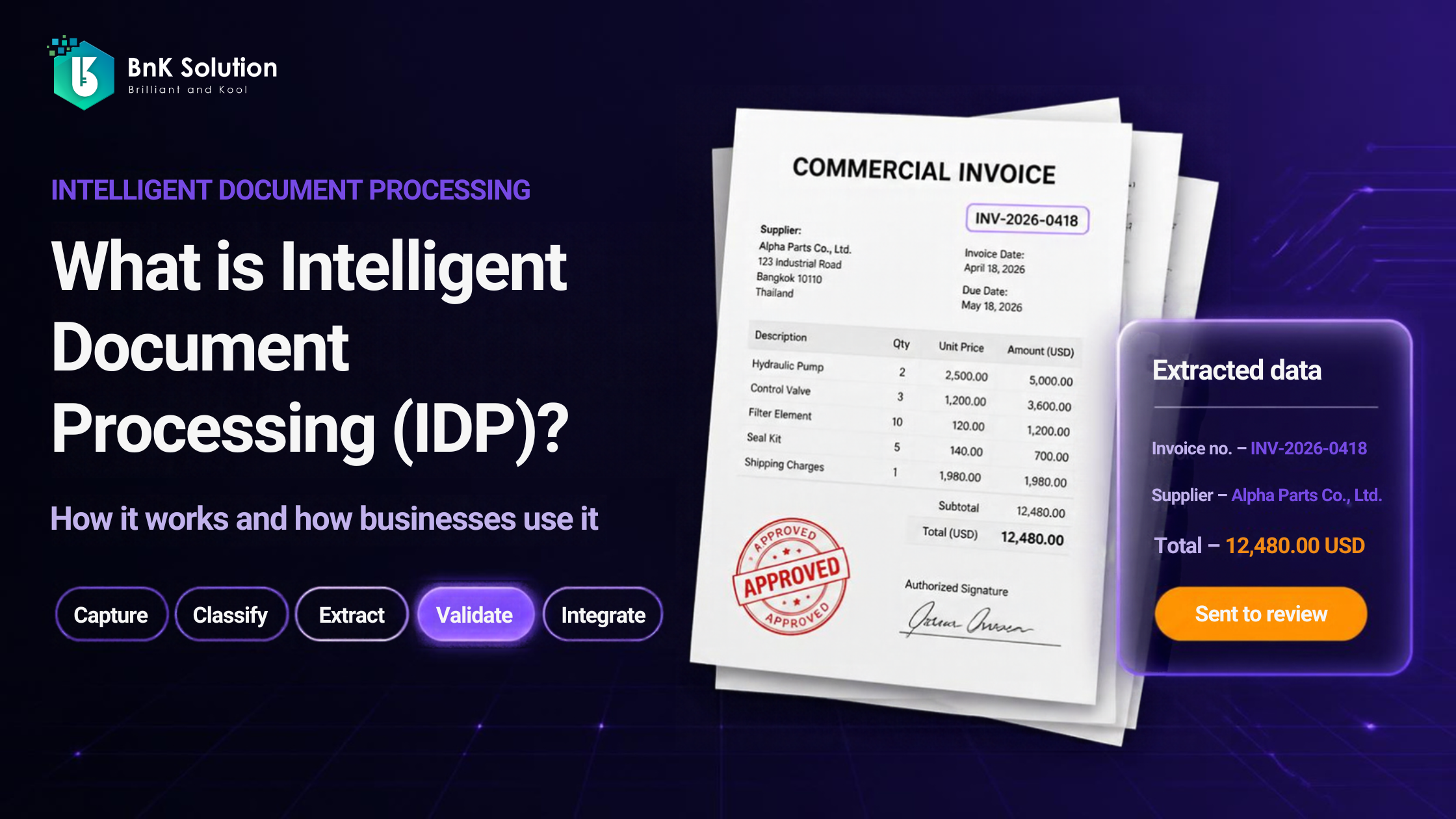
At month-end, many finance and procurement teams still work overtime just to re-key figures from documents into their systems. This article explains IDP by following a single invoice through the process, and helps you decide whether a pilot makes sense for your organization.
What is IDP?
Intelligent document processing (IDP) is a technology that uses AI to automatically read, classify, extract and validate data from documents such as invoices, contracts and scanned files. The data then flows straight into business systems, with human review reserved for exceptions.
IDP combines OCR (optical character recognition) to read text with NLP (natural language processing) and machine learning to understand meaning. The input is often unstructured data, meaning text that does not follow a fixed layout; the output is a set of clearly defined fields such as document number, date and total amount. An IDP solution is therefore one link in a wider document automation chain, not just a digitization tool.
How is IDP different from OCR, RPA and AI chatbots?
OCR reads text, RPA repeats software actions according to a script, and an AI chatbot (a large language model, or LLM, used directly) understands content but but on its own lacks built-in business rules, review steps and an audit trail. IDP places document understanding inside a process with business rules, human review and an audit trail.
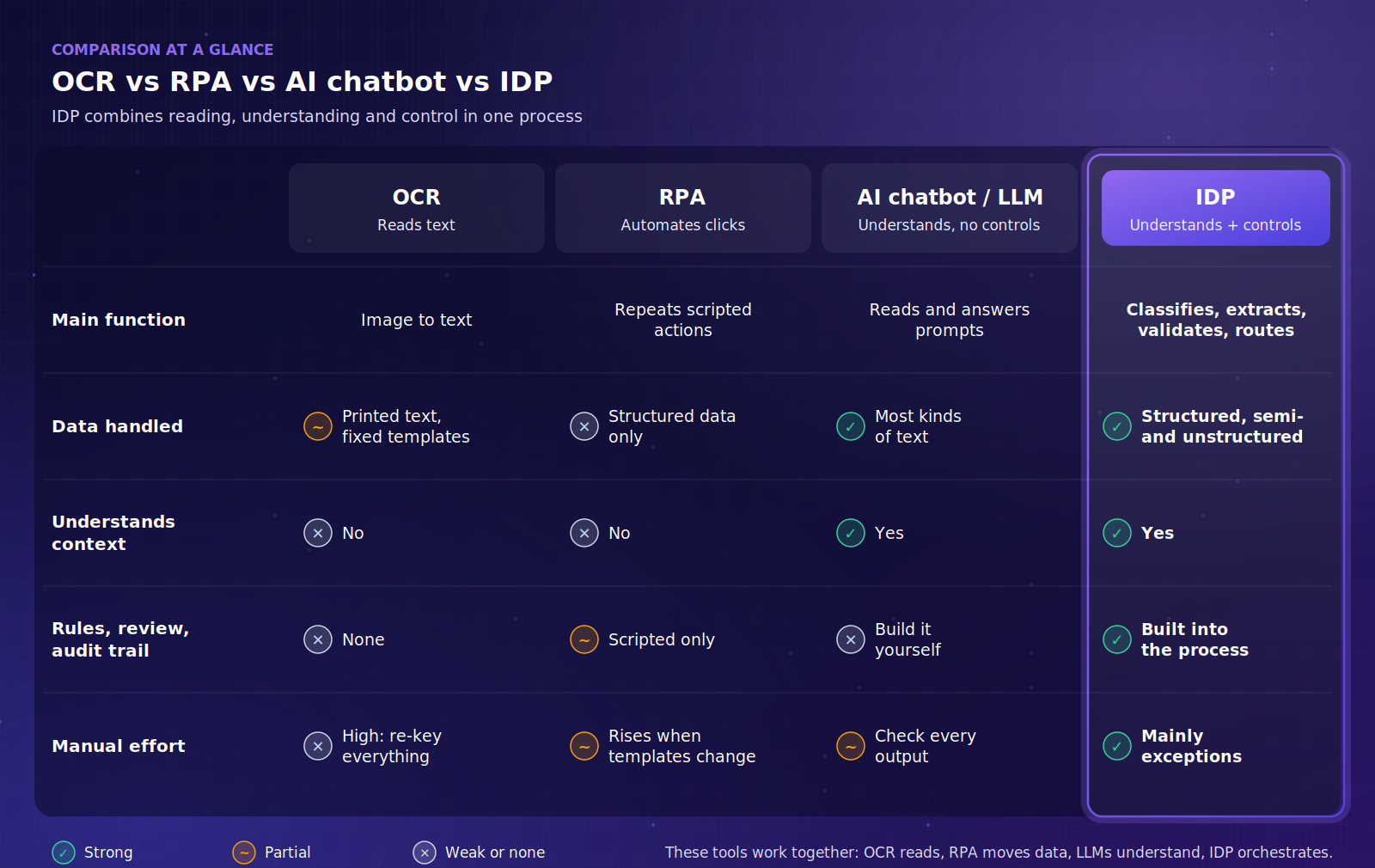
At a glance: OCR vs RPA vs AI chatbot vs IDP. The table below gives the same comparison in text.
These technologies complement each other. OCR is the text-reading layer inside IDP, RPA pushes data into legacy software without an API, and LLMs increasingly act as the component that understands meaning. So the usual answer to IDP vs OCR is: use both.
How does IDP work? The five-step journey of an invoice
IDP processes documents in five steps: capture, classify, extract, validate and integrate. Our example is a scanned PDF commercial invoice from an overseas supplier. Domestic e-invoices in Vietnam already arrive as structured XML files, so they rarely need IDP; documents from foreign partners and paper attachments still do.
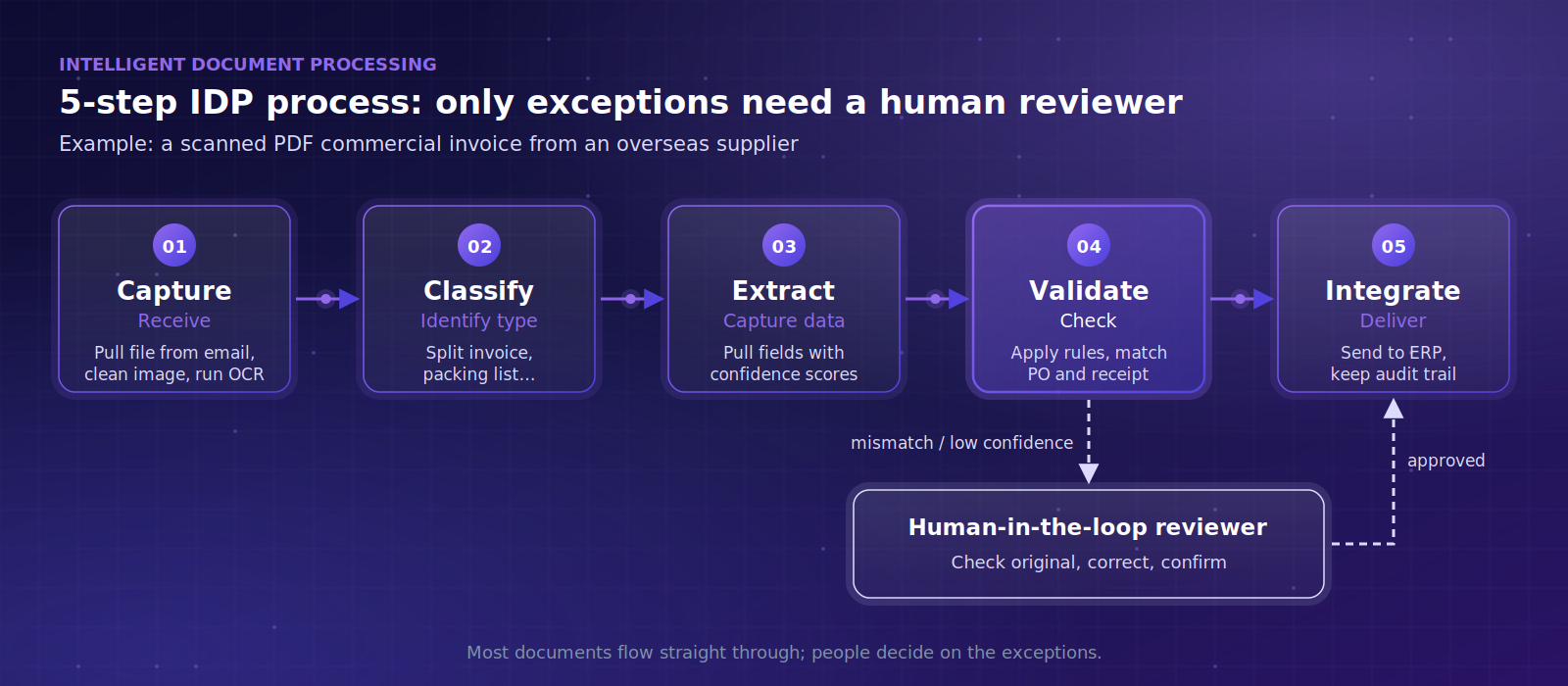
Figure 1. The five-step IDP process and the role of the human reviewer.
Step 1 – Capture: receiving the document
The system collects documents from email, shared folders, scanners or phone photos. The invoice is pulled from the mailbox automatically, the image is cleaned up, and OCR attempts to read all text, including areas partly covered by a stamp
Step 2 – Classify: identifying the document type
A single PDF may bundle an invoice, a packing list and a certificate of origin. IDP separates the pages and labels each document type so that it follows the right workflow.
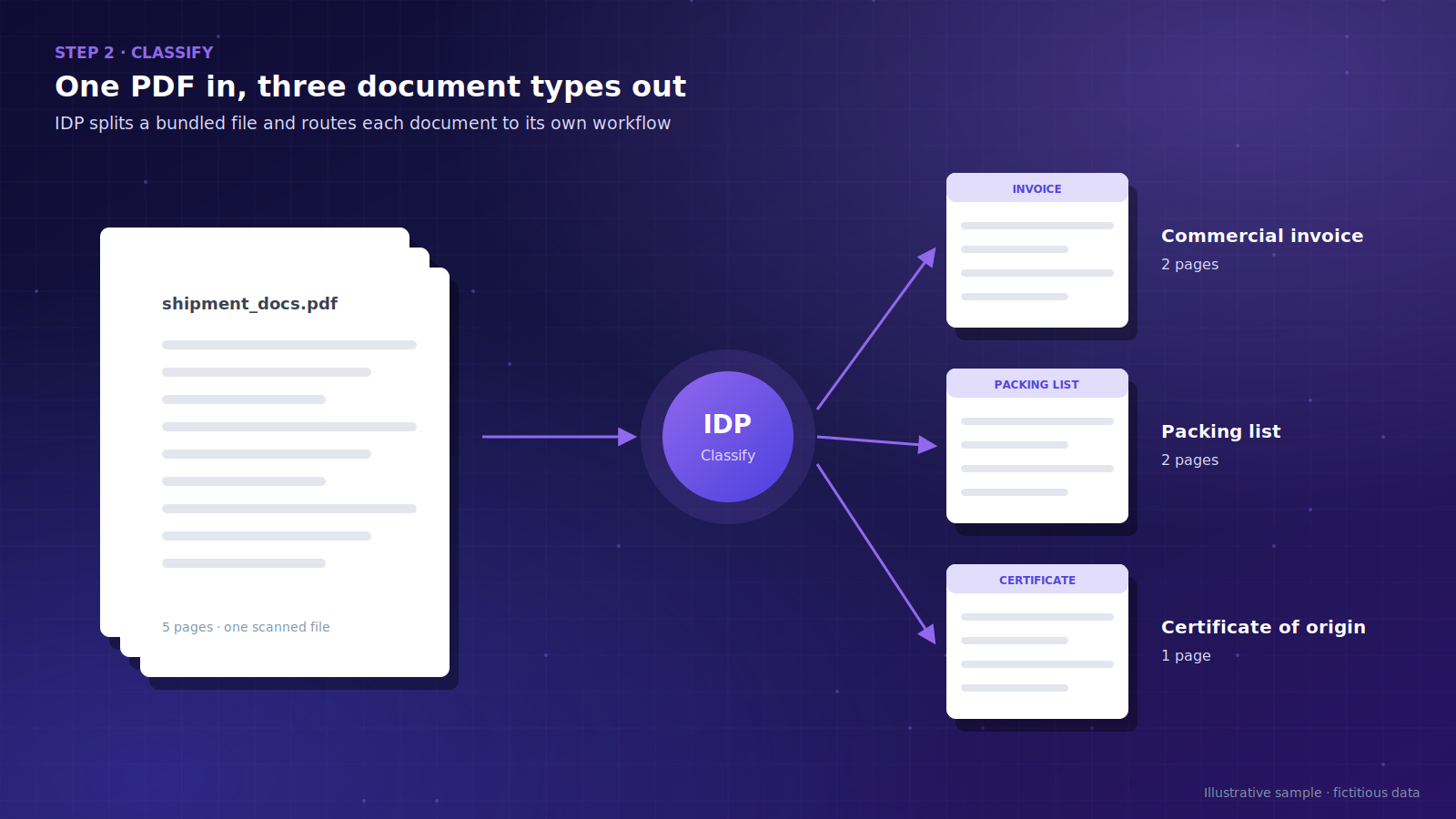
Figure 2. Classification splits one bundled PDF into separate document types.
Step 3 – Extract: capturing the data
The system pulls out the supplier name, invoice number, date, line items, currency and total. Unlike plain OCR, IDP understands that "Total amount", "Amount due" and the Vietnamese "Tổng cộng" refer to the same field, even when they appear in different places. Each field also receives a confidence score
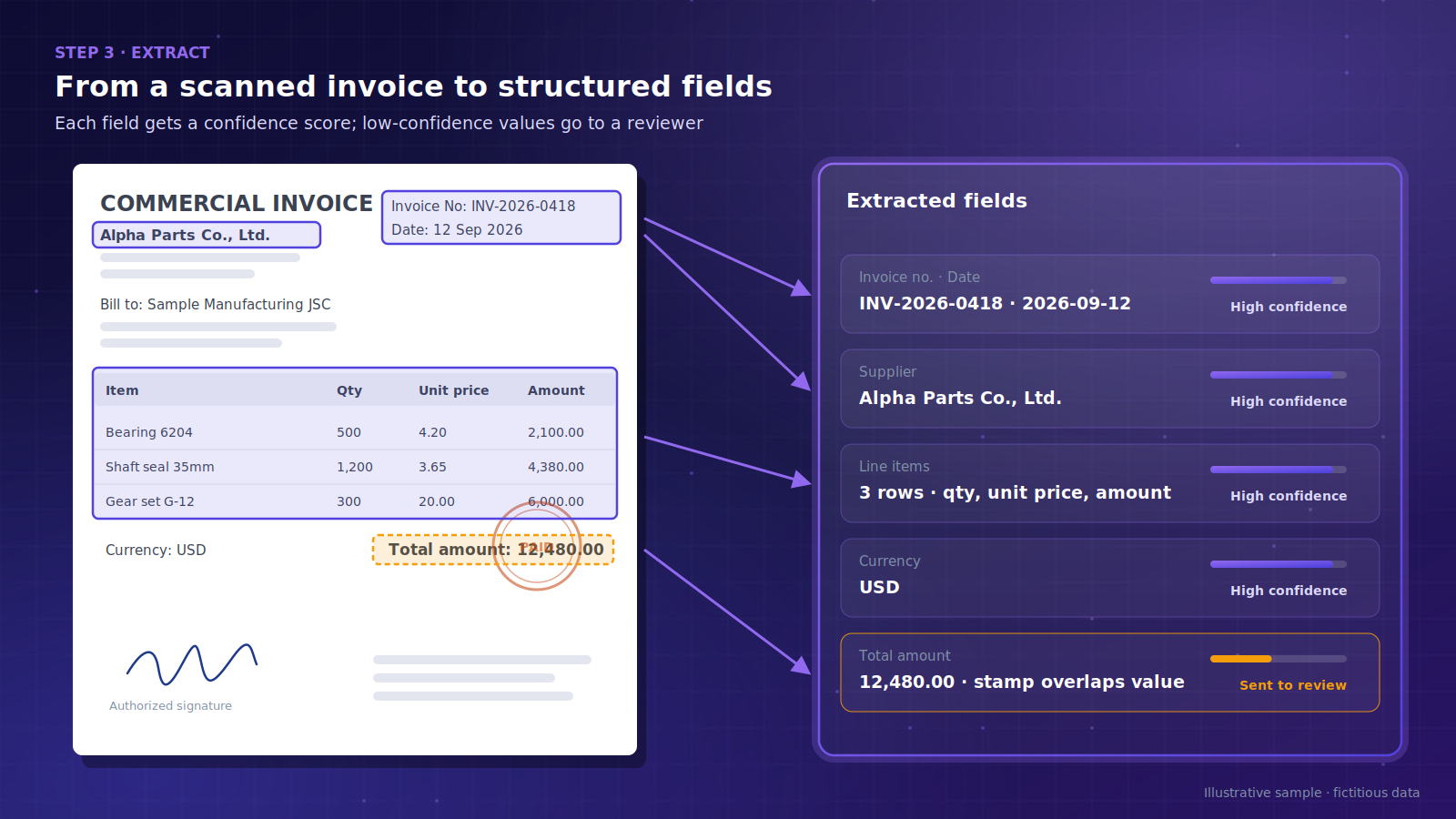
Figure 3. Extracted fields with confidence levels; a stamp over the total triggers review.
Step 4 – Validate: checking the data, and the role of people
The data is checked against business rules: do the line items add up to the total, and do the quantities match the purchase order and goods receipt note? Any field that fails a rule or falls below the confidence threshold goes to a human reviewer. This is the human-in-the-loop model: staff only correct and confirm the flagged fields next to the original image, and final decisions on unusual documents stay with people
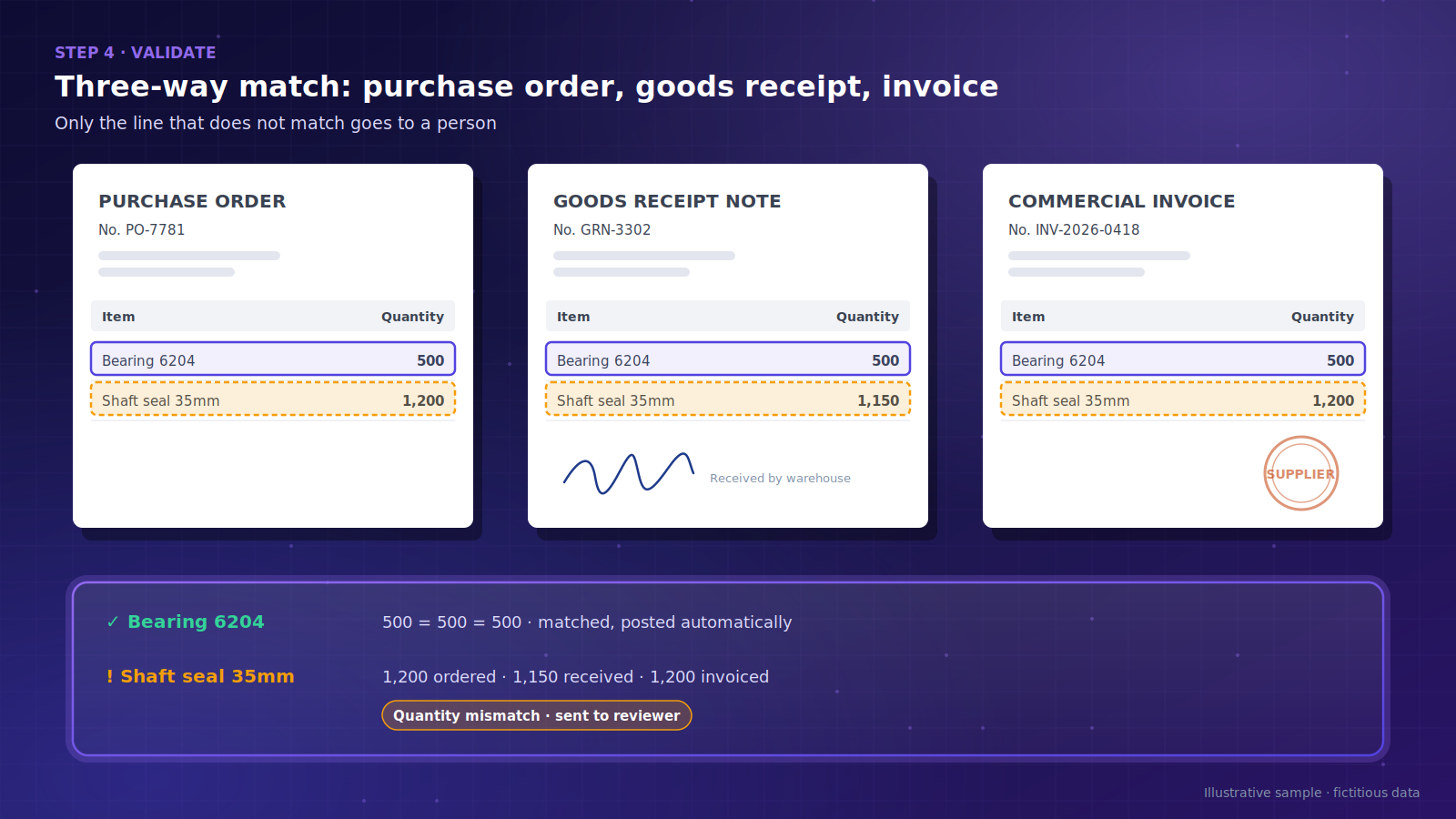
Figure 4. Three-way matching: only the mismatched line reaches a person.
Step 5 – Integrate: sending data to business systems
Approved data flows into the ERP (enterprise resource planning) system, accounting software or a database, via API or an RPA bot. A payable entry is prepared for the accountant to review, and the full processing history is kept for audit.
Vietnamese documents add extra difficulty: diacritics, mixed Vietnamese and English, red stamps over text, and handwriting. When you evaluate a solution, test it with your most difficult documents, not just clean samples.
How is IDP used in banking, manufacturing and logistics?
IDP delivers the most value where there are many documents, many templates and a need to cross-check information between them. The scenarios below are typical and not tied to any specific company.
Banking: customer onboarding and loan files
Typical documents include ID papers, bank statements and financial statements. Done manually, staff re-enter the same information from several documents, which invites inconsistencies and makes it hard to show who checked what during an inspection. IDP cross-checks names, ID numbers and figures across documents and sends only the mismatches to a specialist. Because the data is highly sensitive, banks often require on-premise deployment
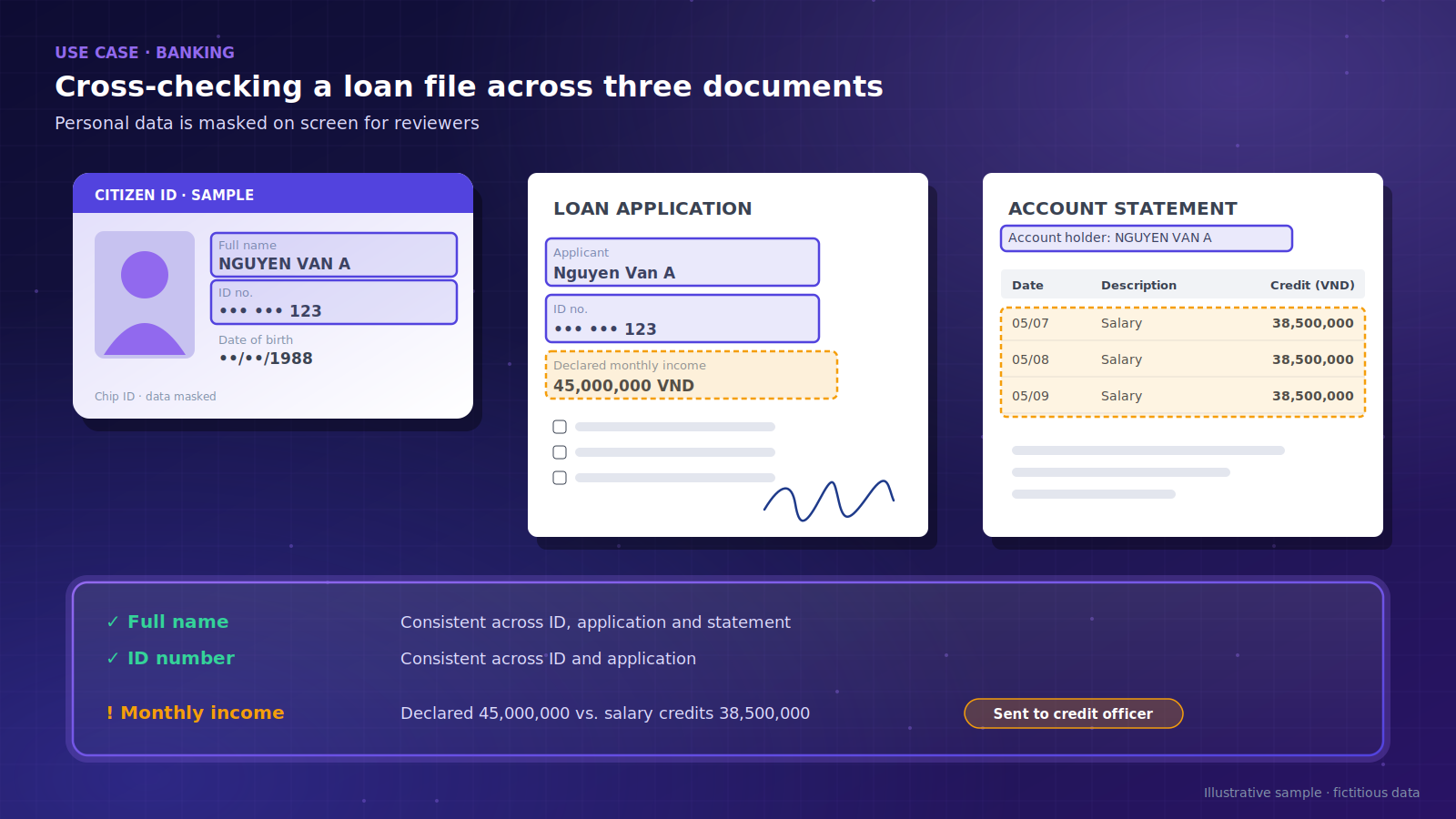
Figure 5. Cross-checking a loan file, with personal data masked.
Manufacturing: purchasing and goods receipt
Typical documents include purchase orders (POs), supplier invoices and goods receipt notes. Three-way matching in spreadsheets takes significant effort, and discrepancies are often caught late, after payment. IDP matches the documents automatically, flags only the lines that differ, and updates the ERP once a reviewer approves
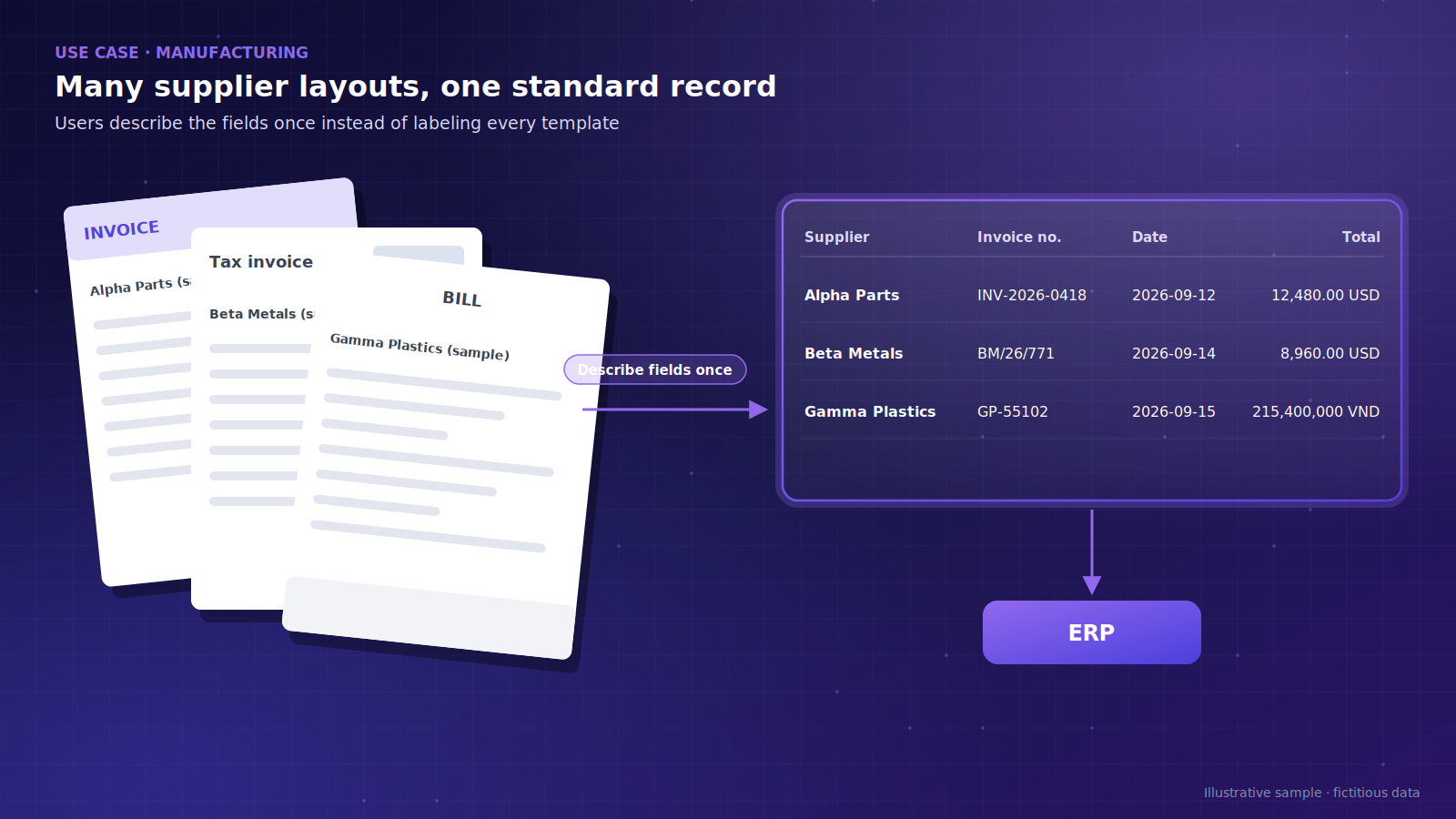
Figure 6. Different supplier layouts become one standard record
Logistics: shipping document sets
Typical documents include bills of lading, packing lists, customs declarations and hand-signed proofs of delivery. Documents come in several languages, and a single wrong figure can delay customs clearance. IDP checks that quantities, weights and item codes are consistent across the set, then passes the data to warehouse or transport management systems
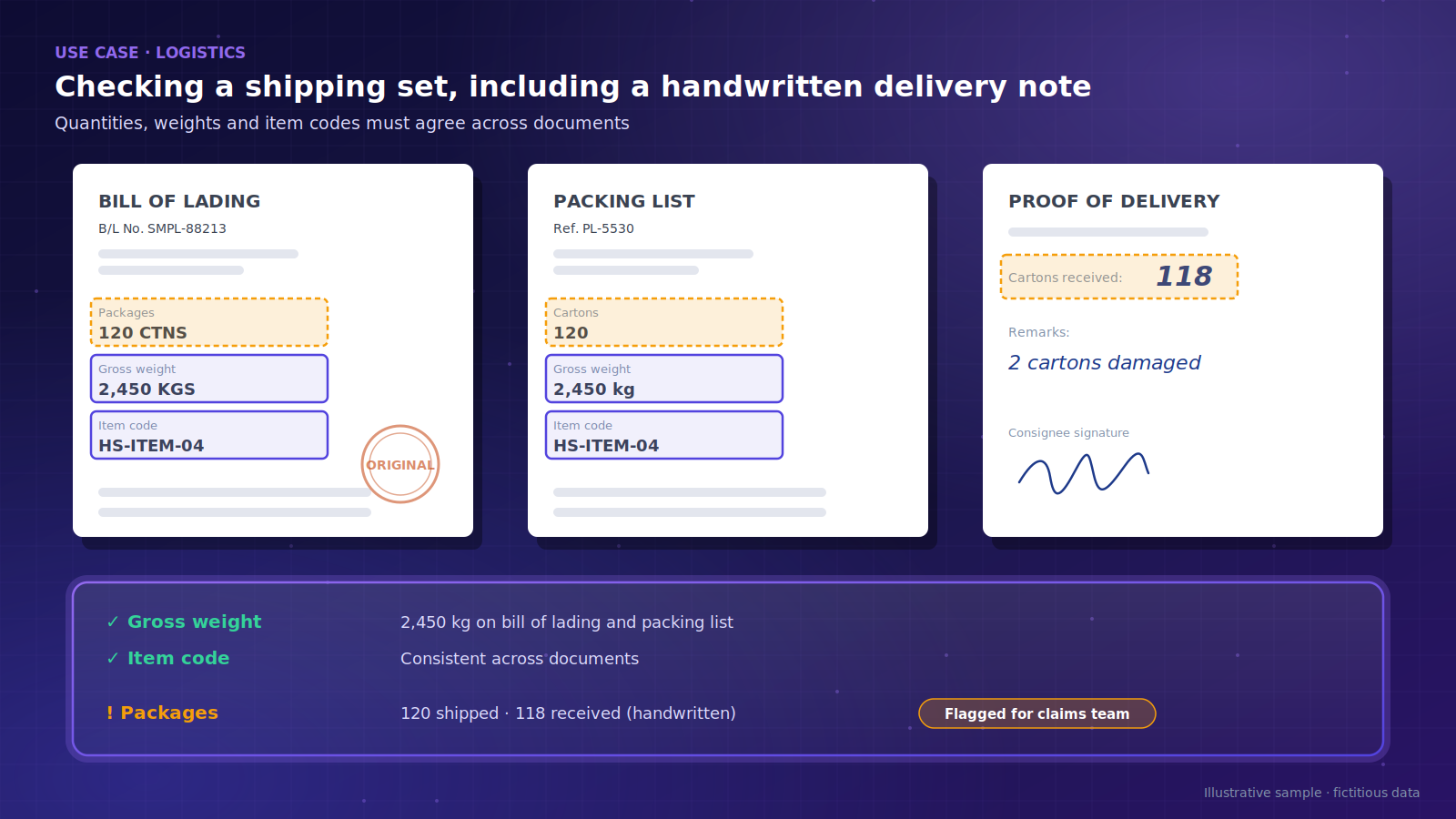
Figure 7. A handwritten delivery note reveals a package shortfall.
Discover BnK IDP. BnK IDP is a no-code platform: users describe the fields they need instead of labeling every template, so new supplier formats can be added quickly. It processes PDFs, images, scans, spreadsheets and handwriting in multiple languages, includes business rules and human review steps, connects via API, databases or RPA, and can be deployed in the cloud or on-premise. Learn more on the BnK IDP
Is IDP right for your organization, and where do you start?
Start with one specific process that has high volume and can be measured, not with the technology.
Signs you should consider IDP
Staff spend hours every day re-keying data from documents.
Documents arrive from many partners, each with its own template.
Data entry errors have caused mismatches in payables or inventory.
You need a processing trail for audits and compliance.
When IDP is not the right choice yet
Volumes are low and manual entry takes only a few minutes a day.
Data already arrives in structured digital form, such as e-invoice XML files or API feeds.
The downstream process is unclear, or no business owner is available to define rules and handle exceptions.
Risks to know in advance
Plausible but wrong extraction: cross-checks and confidence thresholds are the main safeguards.
Quality drift as templates change: track the correction rate every month, not just at acceptance.
Changing roles: staff move from data entry to data quality control, and that shift needs to be managed.
Four steps to get started
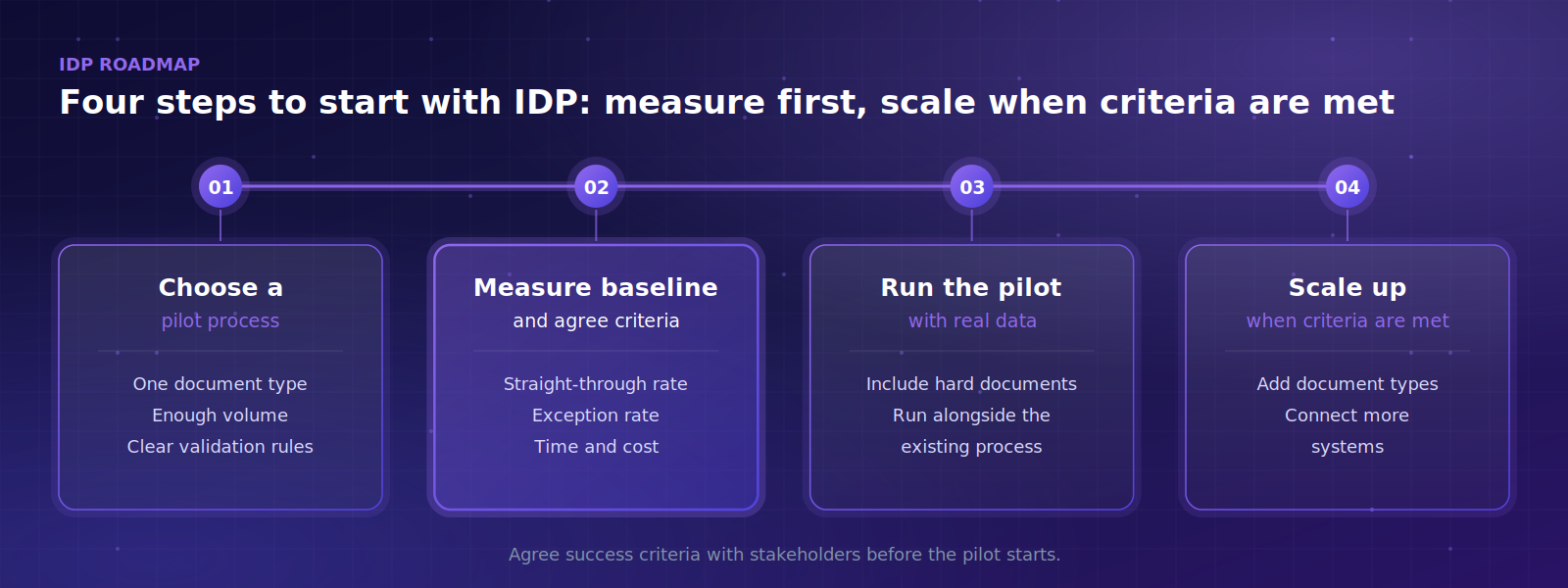
Figure 8. Four steps to start with IDP
Measure the baseline and the pilot with the same metrics: straight-through processing rate (documents that need no human touch), exception rate, and time and cost per document. Total cost depends on volume, document complexity, deployment model and integration effort, not just the license fee.
Data security when processing documents
Legal: comply with Vietnam's Personal Data Protection Law 2025 and Decree 356/2025/ND-CP
Processing location: cloud or on-premise, and whether data leaves the country.
Vendor commitments: certifications such as ISO/IEC 27001, and whether your data is used to train models.
Frequently asked questions about IDP
Can IDP handle handwritten Vietnamese documents?
Yes, but results are less consistent than with printed text, so keep a human review step for critical fields. BnK IDP supports handwriting in multiple languages, including Vietnamese.
What does IDP accuracy depend on?
Mainly on image quality, how varied the templates are and how clearly each field is defined. There is no universal accuracy rate, so measure it on your own documents during the pilot.
How is document data kept secure?
It depends on the deployment model and the vendor's policies. BnK IDP can be deployed in the cloud or on-premise, and BnK is certified to ISO/IEC 27001:2022.
Do I need to replace my current systems?
Usually not; IDP only replaces the manual data entry step. BnK IDP connects via API, databases or RPA bots.
Is IDP worth it for small businesses?
What matters is document volume and repetition, not company size. If you mainly receive e-invoices, your accounting software's XML import may already be enough.
The fastest way to evaluate IDP is to try it on your own documents. Book a demo with the BnK team






--BnK.png)
-1790317058.png)